Coming soonProject PhotoScout by CloudView Photography
Your Photos. Your Hardware. Your Network. Your Sanity.
Where AI gets interesting for me is a different problem: what do you do with 20 TB of photos?
My library is spread across multiple drives and cloud sources. For years my answer was "buy another drive." That stopped working. I tried a paid local tool built for this, and after six days of runs it choked on my library; the advice was to scan less. So I started building my own.
Five pipelines, one PC
SEARCH
- Scan every drive
- Label each section
- Index on my PC
- Plain word search
DEDUPLICATE
- Find folders stored twice
- Compare byte for byte
- Pick the original
- Recycle Bin, only after your yes
MACRO FOCUS STACKING
- Focus bracket set
- Align every frame
- Intelligent Merge
- One sharp image, front to back
- Send to your editing app of choice
PANORAMAS
- RAW pano set
- Stitch any size seteven a tiny planet
- Lossless RAW DNG
- AI Denoise
- Sharpen on RAW file
DISCOVER
- Learn my style from my edits and picks
- Rank every unedited photo
- Surface the gems I missed
- Send to your editing app of choice
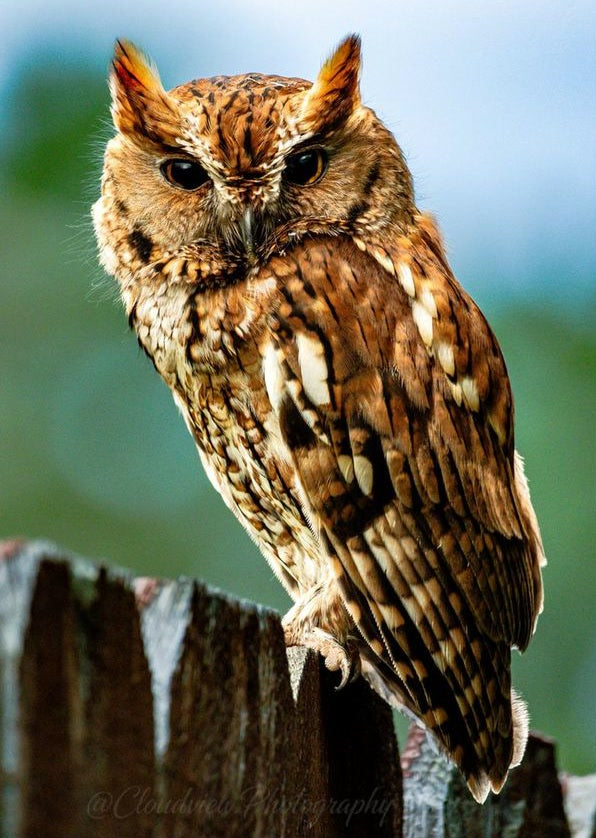
pointy ear tuft
owl face
owl body, feathers
weathered wooden fence
background
Search
Search that reads every part of the photo
This isn't a filename search. During the scan, every photo is labeled in sections, not just as one whole frame. So a small bird in the corner of a big sunrise still counts.
- Scanevery photo on every drive, on my own hardware.
- Label by sectioneach part of the frame gets its own description.
- Search in plain wordsthe query is matched against the sections, not just the whole picture.
- owl
- pointy ear tufts
- feathers
- fence
- weathered wood
- green background
- daylight
animal with pointy ears
426,000+ photos searched in about 3 seconds
For drone pilots
RAW panoramas you can treat as RAW
Shoot your pano in RAW and the stitch comes out as a lossless linear DNG, not a JPEG. It stays a true raw file, so you keep the full dynamic range, and AI Denoise and Sharpen run right on the RAW. JPEG-only sets come out as high-quality JPEG.
- Pick a pano set
RAW or JPEG, straight from the drone card or the library.
- Stitch it
Any size set, up to the largest pano a Mavic 4 Pro or your own camera can shoot, even a tiny planet. Tested on a 155-photo drone pano.
- Save as RAW DNG
RAW sets come out as a lossless linear DNG, not a JPEG.
- AI Denoise and Sharpen
Denoise and sharpen the whole panorama right on the RAW file.
A 360 viewer: spin, zoom, tiny planet, inverted.
Stored twice
Exact copies, proven before anything moves
Finds exact copies, including whole cards copied twice, and proves them identical byte for byte before anything goes to the Recycle Bin.
- A card copied again puts the same files in two folders. PhotoScout finds every pair.
- Every file is compared byte for byte: 6,668 files, 246.3 GB in one run.
- You pick which folder is the original, and it is never touched.
- Only proven copies leave, and only to the Recycle Bin, after your own yes.
Nothing is deleted for good.
Culling
Fast culling, plus best-of-burst picking for wildlife.
My photograph. AI motion.
1. My photograph
2. A text prompt
What do you want to see?
Make the owl fluff its wings and move a little, bringing the picture I took to life.Reference picture: my photograph Runs on this PC, offline
3. AI animation of my photo
The owl is my photograph. Only the motion is AI. The tool is text based: I type what I want to see, give it my photo as the reference, and it makes a 5-second clip. It runs entirely on the PC.
Don't send the library to the intelligence. Bring the intelligence to the library.
More processing, all on your PC
Timelapse with stabilization
Turns a sequence into a timelapse and steadies it, on your own GPU.
Focus stacking, macro or not
In-house focus stacking with Intelligent Merge, for macro and non-macro shots. No extra software.
Every feature
Organize
- Scans every drive and cloud source into one library
- Runs on your PC; photos never need to leave your network
- Nothing goes out unless you choose to send it
Search
- Plain word search across the whole library
- Every photo labeled in sections, not just the whole frame
- 426,000+ photos searched in about 3 seconds
Deduplicate
- Finds exact copies, including whole cards copied twice
- Proves them identical byte for byte
- The folder you keep is never touched; copies go to the Recycle Bin only after your yes
Cull
- Fast culling
- Best-of-burst picking for wildlife
Discover
- Learns your style and preferences from your edits and picks
- Ranks every unedited photo against them
- Surfaces unedited gems you have forgotten, ready to send to your editing app of choice
Process
- Panorama stitching up to the largest set a Mavic 4 Pro or your camera can shoot, even tiny planets
- RAW sets saved as a lossless RAW DNG, with AI Denoise and Sharpen on the RAW file
- 360 viewer: spin, zoom, tiny planet, inverted
- Timelapse conversion with stabilization
- Focus stacking for macro and non-macro shots
- Local denoise
- Text-prompt AI image and video tool that runs entirely on the PC
- One button to send work to your editing app of choice
Minimum: Windows 10/11 64-bit, an NVIDIA RTX 20-series or GTX 16-series card or newer with 8 GB, 16 GB RAM, and about 40 GB free on an SSD.
Recommended: an RTX 30/40/50-series card with 12 GB or more, 32 GB RAM (for big panos), and an NVMe drive.
PhotoScout is in development. Features may change before release.
Local first, private by design
- It runs on my PC. Photos never need to leave my network.
- Scanning, indexing, image analysis, duplicate finding and search all happen on my own hardware.
- Nothing goes out unless I choose to send it.
Putting the GPU to work
I couldn't find a Windows app that really used my RTX 4090 for the heavy lifting. This one does: work that used to take an hour can take minutes. I don't game much anymore, so the 4090 finally has a real job.
First, to be clear
I don't use AI to create my photography, drone or handheld. AI in my workflow is limited to practical editing tools: removing small distractions, denoising, a few edge cases. I stylize my images, but that's composition, exposure, color and cropping, the same craft photographers have always used. The photo starts with what I captured, and it stays my photography.
What's next
Ranking from my own picks, surfacing strong shots I've forgotten, timelapse and stacking, and a tighter hand-off to your editor. Editing itself stays in your editing app of choice; this app handles everything around the edit.
Organize. Search. Deduplicate. Cull. Discover. Process.
It started as a fix for my own 20 TB problem. If other photographers are fighting the same thing, I'd love to hear how you handle it.
PhotoScout questions
Is PhotoScout available yet?
No. PhotoScout is in development. Join the list to hear when it opens.
Do my photos get uploaded?
No. It runs on your PC. Photos never need to leave your network, and nothing goes out unless you choose to send it.
Can it make RAW panoramas?
Yes. RAW sets come out as a lossless linear DNG, a true raw file with full dynamic range, and AI Denoise and Sharpen run right on it.
How does the photo search work?
During the scan every photo is labeled in sections, not just as one whole frame, so plain word searches find small details. It searched 426,000+ photos in about 3 seconds.
How does it handle duplicates?
It proves copies identical byte for byte, never touches the folder you keep, and sends second copies to the Recycle Bin only after your yes.
What hardware does it need?
Minimum: Windows 10/11 64-bit, an NVIDIA RTX 20-series or GTX 16-series card or newer with 8 GB, 16 GB RAM, and about 40 GB free on an SSD. Recommended: an RTX 30/40/50-series card with 12 GB or more, 32 GB RAM (for big panos), and an NVMe drive.
Does CloudView use AI to create its photographs?
No. AI in my workflow is limited to practical editing tools: removing small distractions, denoising, a few edge cases. I stylize my images, but that's composition, exposure, color and cropping. The photo starts with what I captured, and it stays my photography.
Get notified when PhotoScout opens
PhotoScout will be a digital download for Windows. Leave your email and I'll tell you when it's ready.
One email when it launches. No spam.